
Call on order
010-82912186
Data backup and export of 3S-J5000 ozone detector
Views :
Update time : 2025-08-08
Data backup and export of 3S-J5000 ozone detector
Operation steps for the 3S-J5000 data recording function: Click on the "Settings" menu on the left, and then click "Save".
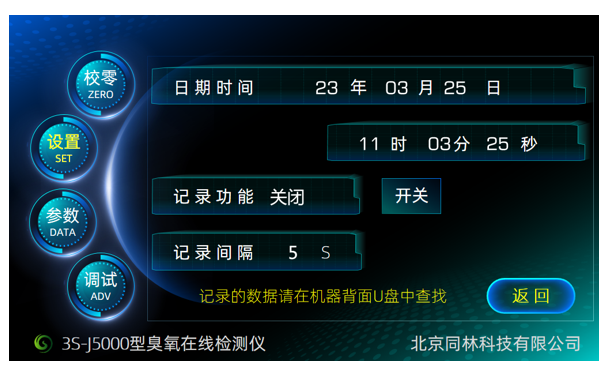
The storage menu is a menu for setting the recording time and switching the recording function. The data will be automatically recorded to a random USB flash drive. Users can also use other USB flash drives as substitutes. The storage format is a table, and the data will be stored until it is full.
Related News
Read More >>
 Ozone and Indoor Air Quality:
10 .16.2026
Ozone and Indoor Air Quality: What Building Managers Need to KnowIndoor air qual
 Comparing Ozone Measurement Te
10 .16.2026
Comparing Ozone Measurement Technologies for High-Purity ApplicationsIn high-pur
How to Install a Dissolved Ozo
10 .10.2026
How to Install a Dissolved Ozone Monitor in Your Water LineA dissolved ozone mon
 Common Myths About Ozone Detec
10 .10.2026
Common Myths About Ozone Detection DebunkedOzone detection technology has mature